Skip to content
SKSuraj Kumar

Sales operations

Lead Operations Automation

n8n workflow automation

Lead Operations Automation is my own name for a self-directed build. It is not a product on the market.

Three n8n workflows that take the admin out of sourcing and outreach — enrich a contact, verify it, route it, and record what happened.

  • Automation
  • n8n
  • Automation
  • Integrations
  • Sales ops
Role
Sole builder. Workflow design, node-level error handling, prompt contracts for the model steps, and the sheet and CRM schemas the runs write into.
Work type
Automation build
Timeline
Three workflows · 2024
Status
Case study published
Industry
B2B services
Client
Independent build

Interface built in code for this case study — not a client screen capture.

01Business problem

What was actually going wrong

Nobody quits a sales job because of selling. They quit because of the forty minutes between finding a company and being ready to contact it.

Who feels it

  • Whoever is doing sourcing alongside actual client work
  • Small teams with no RevOps function and no budget for one
  • Anyone maintaining a lead sheet by hand
  • Prospects contacted twice because two records existed

The sourcing work I was doing had a shape to it. Find a company. Open the site. Work out what they run on. Find the right person. Guess an email address. Check whether the guess bounces. Write something that refers to what the company actually does. Paste it into a sheet so the follow-up in nine days is not a surprise. Repeat.

Each of those steps takes a minute or two and none of them is difficult. That is exactly why they get skipped. The email goes out unverified and bounces. The sheet gets updated tomorrow, and tomorrow it does not. Two weeks later the same company is contacted twice by two different routes, and nothing reads as unserious faster than that.

I built these as automations, not as a script, because the useful version had to be triggerable from wherever I already was — a Slack message, a voice note on Telegram, a row pasted into a sheet — and it had to keep running when a step failed instead of dying silently at three in the morning.

02Product overview

What got built

A trigger, a validation gate, enrichment, a drafting step, then a routing decision taken from the verification result — not from what the model hoped.

Engineering notes

  • One normalised payload shape for three different trigger types, so downstream nodes are shared rather than duplicated per entry point.
  • Validation gate placed before every paid call, which turned malformed input from a cost into a rejection.
  • Model outputs constrained to a fixed schema with explicit nulls, so branching happens on fields and never on string matching.
  • Per-node retry with backoff plus a run-level retry budget, because per-node limits alone do not stop a rate-limit storm.

The first workflow starts from a Slack message. It pulls the company and contact out of the text, enriches the contact through a data provider, drafts copy appropriate to the channel, then verifies the email address. What happens next depends entirely on that verification result: a deliverable address goes to email, an undeliverable or risky one is routed to LinkedIn instead, and a hard failure stops and reports itself. Nothing is ever sent to an address that will bounce.

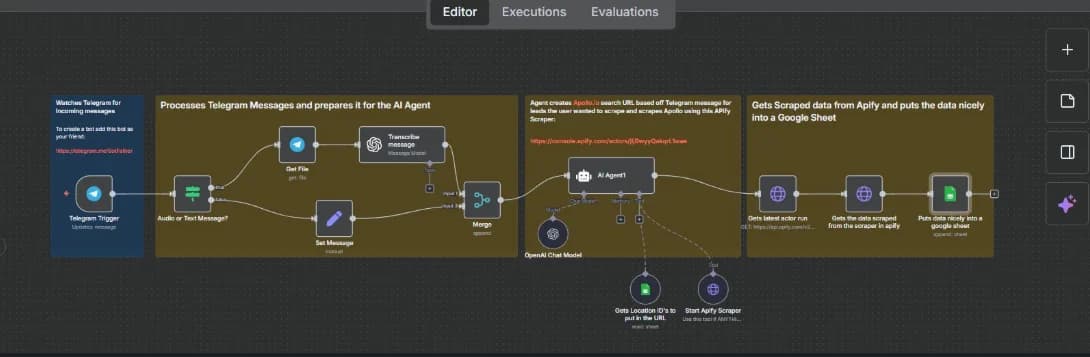
The second takes a spoken request in Telegram — a voice note, usually, because that is faster than typing on a phone — transcribes it, turns it into a structured search — not a keyword string — runs the sourcing job, and writes normalised rows back into the sheet the request came from. The person asking never opens the tool doing the work.

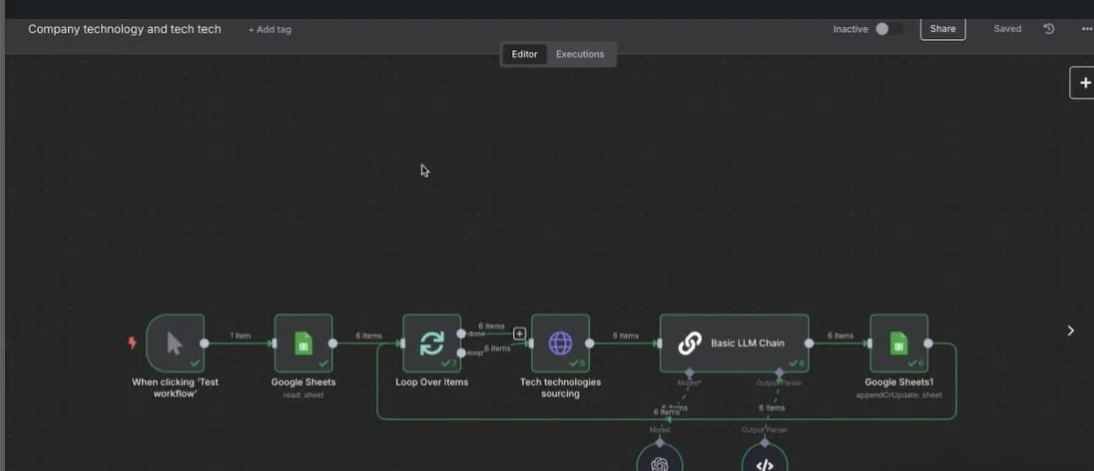
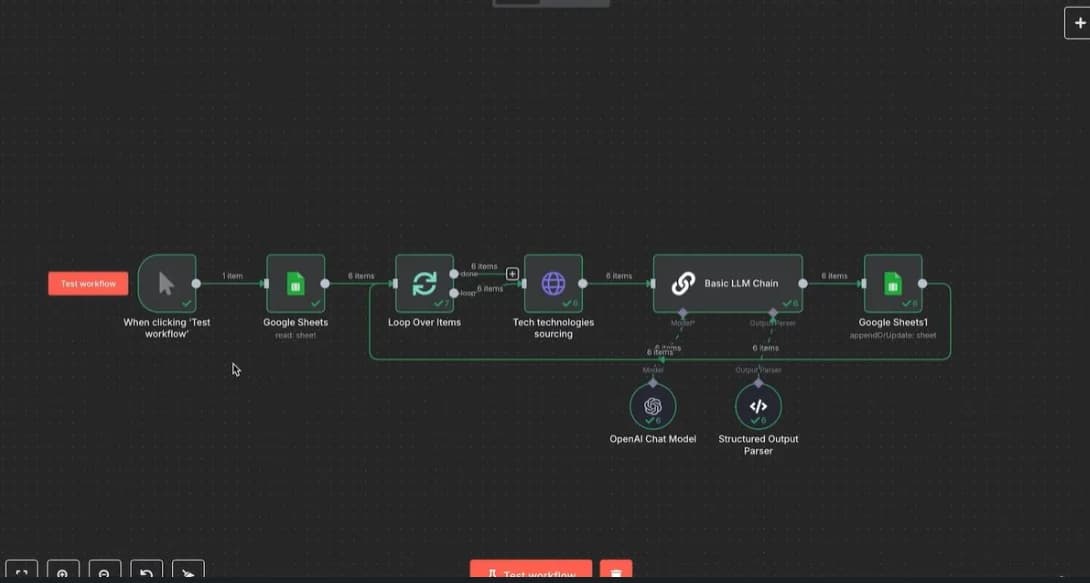
The third reads a column of domains, fetches and reads each site, and classifies the technology stack into a fixed set of categories so the results are comparable across a thousand rows. A free-text answer per row would have been easier to build and useless to sort.

The part that took the longest was not any of the happy paths. It was deciding what each workflow does when a provider returns a 429, when a domain resolves but serves nothing readable, and when the same lead arrives twice from two triggers. Those three cases account for most of the node count.
03Key features

What the software does, feature by feature

8 capabilities, of which 2 are model-backed. The rest are ordinary deterministic software, and the distinction is marked so the AI claim stays honest.

  • 01

    Trigger from where the work already happens

    Slack message, Telegram voice note, or a new row in a sheet. Nobody logs into an automation tool to start a job — that friction is the reason the manual version persists.

  • 02

    Validation before spend

    Required fields, domain format and a duplicate check run before any paid enrichment call. A malformed row costing an API credit is a bug, not an edge case.

  • 03

    Structured extraction from loose inputmodel-backed

    Freeform text or a transcript becomes a typed object — company, contact, role, intent — with a fixed schema, so a downstream node branches on a field and never parses a sentence.

  • 04

    Enrichment with provenance

    Every enriched field records which provider supplied it and when. When a bounce happens later, the question "where did this address come from" has an answer.

  • 05

    Channel-appropriate draftingmodel-backed

    Copy is drafted against what the enrichment actually returned, and refers only to facts present in the payload. An opener that invents a detail about the company is worse than a generic one.

  • 06

    Routing on verification, not optimism

    The send channel is chosen by the verification result. Deliverable goes to email; risky or undeliverable goes to a manual channel; unknown holds for review rather than guessing.

  • 07

    Idempotent writes

    Each run computes a key from the domain and contact, and a repeat key updates the existing row instead of appending a second one. Re-running a failed workflow is safe.

  • 08

    Failure that reports itself

    A failed node posts the run ID, the failing step and the payload shape back to the channel that triggered it. Silent automation failure is worse than no automation.

04User flow

How a person moves through it

The path from the trigger to the finished record, with each step attributed to whoever performs it — a person or the system.

  1. 01PersonDrops a company name and context into Slack, or records a voice note in Telegram.
  2. 02WorkflowExtracts the entities into a typed object and rejects the run if the required fields are not present.
  3. 03WorkflowChecks the sheet for an existing record on the same domain and contact.
  4. 04WorkflowCalls enrichment, stamping each field with its source.
  5. 05WorkflowDrafts channel-appropriate copy from the enriched payload only.
  6. 06WorkflowVerifies the email address and branches on the result.
  7. 07PersonReviews anything the workflow held: risky addresses, ambiguous matches, low-confidence extractions.
  8. 08WorkflowWrites the outcome back to the sheet and posts a one-line summary to the trigger channel.

05Architecture

How it is put together

The processing path first, then the layers it runs on, then the constraints that shaped both.

Path through the system

7 stages

  1. 01

    Trigger

    Slack event, Telegram message or sheet row. The trigger normalises into one payload shape immediately, so the rest of the workflow does not care where the job came from.

  2. 02

    Validate

    Required fields, domain sanity, and a duplicate lookup. Failing here costs nothing; failing after enrichment costs an API credit and leaves a half-written record.

  3. 03

    Transform

    Loose text or a transcript becomes a typed object with a fixed schema. Optional fields are explicitly null, never absent, so later branches can test them.

  4. 04

    Enrich

    Contact and company lookups, each with a per-provider timeout and a fallback. A slow provider degrades the run; it does not fail it.

  5. 05

    Update CRM

    An idempotent upsert keyed on domain plus contact. The write happens before the notification, so a notification is never sent about a record that does not exist.

  6. 06

    Notify

    A one-line summary back to the channel that triggered the run, with the record link and anything held for review.

  7. 07

    Log

    Run ID, node path, provider responses and timings retained per execution. A failure found two weeks later is diagnosable from that record alone.

Layers

Orchestration
n8n workflowsSub-workflows for shared stepsPer-node error branchesScheduled and event triggers
Inputs
Slack Events APITelegram Bot APIWhisper transcriptionGoogle Sheets rows
Model steps
Entity extraction to a fixed schemaChannel-appropriate draftingStack classification into fixed categories
Data providers
Contact enrichmentEmail verificationSite reader for page contentTechnology detection
Destinations
Google Sheets as the record of truthGmail for verified sendsSlack and Telegram for run reporting

Why it is shaped this way

  • Every model step returns a schema, never prose. A drafting node is the only one allowed to produce a paragraph, and even that is constrained to fields present in the payload.
  • Retries are configured per node with a cap, and a retry budget for the whole run. Without the second limit, a rate-limited provider turns one job into a hundred requests.
  • Sheets is the record of truth, not a report of it, because the person doing the work already lives in the sheet. Moving that into a database would have added a system nobody asked for.
  • Credentials sit in the n8n credential store, not in node parameters, so an exported workflow can be shared or version-controlled without leaking a key.

06Technical decisions

The choices that mattered, and what each one cost

Every decision here was contested by a reasonable alternative. The trade-off column is the part usually left out.

01

n8n over a Python script on a cron

Why

The failure surface of this kind of work is almost entirely integration glue — auth, pagination, retries, webhook signatures. n8n already has that, and its execution log makes a failed run legible without adding observability code.

Trade-off

Logic that would be four lines in Python becomes three nodes and a JSON expression, and complex branching gets visually noisy fast. Anything genuinely algorithmic belongs in a code node, not in the canvas.

02

A small model for extraction and drafting, not a large one

Why

Both jobs are constrained: pull named fields out of short text, and write two sentences from a fixed payload. Per-run cost matters far more than eloquence when the workflow fires a few hundred times.

Trade-off

Ambiguous input is handled less gracefully, so the schema has to tolerate nulls and the validation gate has to be stricter than it would be with a stronger model.

03

Verify the address before choosing the channel

Why

Domain reputation is cumulative and slow to repair. Routing an unverified address to email trades a permanent cost for a few seconds of latency.

Trade-off

A verification provider becomes a hard dependency in the middle of the run, and a slow response delays every job in the queue behind it.

04

Idempotency keys instead of a de-duplication pass

Why

Cleaning duplicates after the fact means the second contact has already been sent. Keying the write makes a re-run safe — and a re-run is what actually happens once a workflow is fixed and replayed.

Trade-off

The key has to be chosen carefully — too loose and distinct contacts at one company collapse into a single row; too tight and a corrected job title creates a new record.

07Challenges

What was genuinely difficult

Not the setup work. These are the problems where the first implementation was wrong and had to be reconsidered.

01

A provider started returning 429s mid-batch and the workflow kept hammering it.

Approach

Per-node retry with exponential backoff, plus a run-level retry budget that stops the whole execution once it is exhausted, and a queue mode so a stalled run does not block the next trigger.

Outcome

A rate-limited provider now slows the batch and reports it. One job no longer turns into a hundred requests and leaves the key throttled for the rest of the day.

02

Site reading failed on the sites that mattered most — the ones rendering everything client-side.

Approach

A reader service that executes the page, with a fallback chain: reader, then plain fetch, then a detection-only result. Each fallback records which path produced the answer.

Outcome

Rows now carry a confidence-by-source, and "we could not read this site" is a recorded state, not a silently empty column.

03

Two triggers created two records for the same company within an hour.

Approach

A normalised key from the registrable domain and a slug of the contact name, checked before enrichment and used again as the upsert key on write.

Outcome

Duplicate triggers now converge on one row. The check before enrichment also removed the wasted credits that were the first symptom of the problem.

08Business value

What it changes for the business

Stated qualitatively on purpose. Invented percentages are the easiest thing to put on a portfolio and the easiest thing to see through.

Operational effect

  • The clerical part of sourcing stops competing with the part that requires judgement.
  • A contact is never approached on an address that verification already flagged as undeliverable.
  • Requests can be made by voice from a phone, so the work does not have to wait for a desk.
  • Every row carries where its data came from, so a bad list is diagnosable and not merely disappointing.
  • A failed run announces itself in the channel that triggered it, so nobody discovers a week of silence later.

What would change at scale

  • Sheets stops being a sensible record of truth somewhere in the low tens of thousands of rows; the upsert would move to Postgres with the sheet becoming a view.
  • Provider calls would need a shared cache — the same domain gets enriched repeatedly across runs today, which is fine at this volume and wasteful at ten times it.
  • Model steps would move behind a single internal endpoint so prompt changes are versioned and testable, not edited in a node on a live canvas.

09Interface

The screens where the work happens

Dense operational views rather than dashboards. These are used for hours at a time, so the priorities are legibility, keyboard flow and state that is never ambiguous.

Run list

Executions with their trigger, duration and terminal state. The interesting rows are the failures, so they are not tucked behind a filter.

Node path

The stages a single run passed through, where it branched, and which provider answered at each step.

Branch decision

The verification result and the routing choice it produced, shown together — the decision is only checkable next to its input.

Failure detail

A rate-limited enrichment call, its retry attempts, and the point at which the run-level budget stopped it.

A diagram of the automation as built: its trigger, its steps, the services it touches and what it does when one of them fails. Drawn for this page from the workflow itself — it is not a capture of the editor, and it is not someone else’s published workflow.

Screenshots of the real thing

3 captures · my own workspace, no client deployment

  • n8n canvas showing a lead capture workflow branching between email and LinkedIn outreach after email verification

    Outreach routing workflow

    The actual canvas, captured in the n8n editor. The branch on the right is the verification decision — email one way, manual channel the other.

  • n8n canvas turning a Telegram voice note into a structured lead sourcing job that writes back to a sheet

    Voice-to-lead sourcing

    Transcription, then structured search, then a normalised write back to the sheet the request came from.

  • n8n canvas reading company domains from a sheet and enriching each row with a categorised technology stack

    Stack enrichment

    Read the sheet, fetch and read each site, classify into fixed categories, write back in place.

Unlike the coded interface above, these are unedited captures of the real tool. Identifying details in the payloads have been removed; nothing has been rearranged to look tidier than it actually is.

10Technologies

What it is built with

Chosen for the shape of the problem, not for novelty. Anything unusual is justified in the decisions section above.

Orchestration
  • n8n
  • Sub-workflows
  • Queue mode
  • Per-node error branches
Triggers
  • Slack Events API
  • Telegram Bot API
  • Google Sheets trigger
  • Webhooks
Model steps
  • GPT-4o-mini
  • Whisper transcription
  • Schema-constrained outputs
Data providers
  • Dropcontact
  • Email verification
  • Jina AI Reader
  • BuiltWith
  • Apify
Destinations
  • Google Sheets API
  • Gmail API
  • Slack
  • Telegram

Implementation detail

  • One normalised payload shape for three different trigger types, so downstream nodes are shared rather than duplicated per entry point.
  • Validation gate placed before every paid call, which turned malformed input from a cost into a rejection.
  • Model outputs constrained to a fixed schema with explicit nulls, so branching happens on fields and never on string matching.
  • Per-node retry with backoff plus a run-level retry budget, because per-node limits alone do not stop a rate-limit storm.
  • Idempotency key computed from registrable domain plus contact slug, used for both the pre-check and the upsert.
  • Fallback chain for site reading, with the successful path recorded on the row.
  • Failure notifications carry the run ID and node path — enough to find the fault without opening the canvas and guessing.

11Technical preview

Structure, models and annotated excerpts

There is no repository link on this site. What is available instead is the module structure, the data model, the interface contracts and annotated excerpts written for this case study — enough for a technical reviewer to judge the engineering.

Technical preview

Implementation detail for this build

Selected implementation details are available for technical review: component structure, data models, architecture notes and sanitized code excerpts. Some client-specific source material stays private because of confidentiality. Enter the project access keyword if you have been given one — the same one works across every case study.

A presentation convenience, not authentication. This is a static site, so the keyword ships to your browser with the page and anyone reading the bundle can find it — worth saying plainly rather than dressing it up. Nothing confidential is stored behind it.

Inside this section

  • Module and folder structure for the build
  • Data models and the interface contracts between layers
  • 4 annotated implementation excerpts
  • Design notes covering the decisions the excerpts imply
  • The same keyword opens every case study on the site

For private client work, contact me for a walkthrough.

Next step

Need something along these lines?

Send the process, the constraints and the deadline. You will get an honest scope, an architecture sketch and a timeline before any commitment.

Email
surajk86808@gmail.com
Based in
Bengaluru, India
Working hours
IST (UTC+5:30)
Availability
Taking new engagements